
WhatsApp introduces bill payment feature in India

WhatsApp has become an integral part of daily life in India, with people using it for tasks like phone recharges, booking metro tickets, and accessing government services through chatbots, all within a chat interface they are familiar with.
Now, WhatsApp is launching a new feature for bill payments in India, designed to simplify the process of managing and paying everyday household and utility bills directly through the app. This feature is powered by the Bharat Connect (BBPS) network, providing access to 22,722 billers across 30 categories, including electricity, gas, water, FASTag, insurance, credit card, and loan repayments.
Arun Srinivas, Managing Director and Country Head of Meta (India), stated, “For millions of Indians, WhatsApp is already the simplest way to stay close to family and friends, talk to businesses, access citizen services, and buy everything from metro tickets to insurance – all without leaving the app. With Bill payments, we’re bringing that same simplicity to one of the most routine tasks in every household. No more juggling apps or tracking multiple due dates. We want to make paying a bill on WhatsApp as effortless as sending a message, and help bring the convenience of digital payments to people across the remotest parts of the country.”
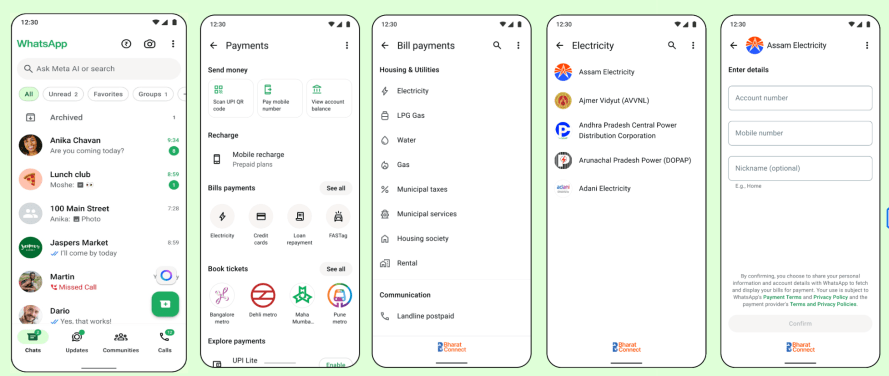
With this new feature, users can pay their utility bills securely and conveniently, much like sending a message, without needing to leave WhatsApp. By tapping the ₹ icon at the top of the home screen, users can access bill payments, view past payments and upcoming bills, manage multiple accounts under a single provider, and choose their preferred payment method.
Features of Bill Payments on WhatsApp
- Household bills summary: Bills are pre-fetched, and any biller previously paid through WhatsApp appears on Payments Home for easy access.
- Multiple accounts per biller: Users can manage bills for home, office, and family under one provider, all within the app.
- Popular categories on Payments Home: Frequently used bill categories are automatically displayed, with a “See All” option to browse over 20 categories.
To use the Bill payments feature, follow these steps:
- Open WhatsApp and tap the ₹ icon at the top of the home screen.
- Select the bill category and biller.
- Add and confirm your account details.
- Review the bill amount and required details.
- Select your payment mode (UPI, Debit Card, Credit Card).
- Confirm the payment.
With Bill payments now integrated into WhatsApp, the app extends its utility further, offering a seamless experience for an essential, high-frequency task. This feature is being gradually rolled out to users across India and will be available on both Android and iOS devices over the coming weeks.


